


Online Sale!
100% Guaranteed Genuine Parts
Online Sale!
100% Guaranteed Genuine Parts
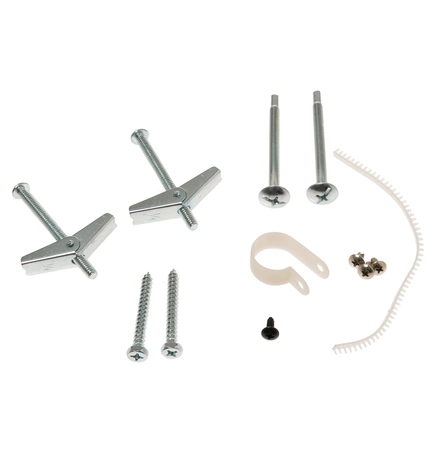
WB02X35527 GE Hardware Kit
Maintain the functionality of your microwave with this reliable fastener kit from a trusted brand. Designed specifically for compatibility with GE, Hotpoint, Haier, Monogram, and Café appliances, this hardware kit ensures a perfect fit and seamless installation. Whether you're replacing worn-out components or conducting routine maintenance, this part is essential for optimal performance. With its durable construction, this fastener kit promises longevity and dependable service, allowing you to operate your microwave with confidence. Maintain your appliance today and enjoy the peace of mind that comes with using high-quality parts tailored specifically for your needs.
Weight : 0.24 lbs
Package Dimension : 6.73 x 3.31 x 1.89
Compatible Brands


About this product
Maintain the functionality of your microwave with this reliable fastener kit from a trusted brand. Designed specifically for compatibility with GE, Hotpoint, Haier, Monogram, and Café appliances, this hardware kit ensures a perfect fit and seamless installation. Whether you're replacing worn-out components or conducting routine maintenance, this part is essential for optimal performance. With its durable construction, this fastener kit promises longevity and dependable service, allowing you to operate your microwave with confidence. Maintain your appliance today and enjoy the peace of mind that comes with using high-quality parts tailored specifically for your needs.
Weight : 0.24 lbs
Package Dimension : 6.73 x 3.31 x 1.89
1. Unscrew the old hardware: Place a flathead screwdriver into the slot on the hardware and rotate it counterclockwise until the nut is loose enough to be removed.
2. Remove the old hardware: Carefully remove the old hardware from your stove top or range, along with any remaining screws and pieces.
3. Gather new installation hardware: Collect the new components of your GE WB02X35527 Installation Hardware, which includes the escutcheon plate, mounting bracket, and four screws.
4. Attach the mounting bracket: Align the escutcheon plate with the mounting bracket and secure them with two screws.
5. Place the assembly in the stovetop or range: Place the connected escutcheon plate and mounting bracket against the stovetop or range, ensuring that all four holes align with the existing holes.
6. Secure the hardware: Push the remaining two screws through the assembly and into the stovetop or range. Tighten them securely with a Phillips-head screwdriver.
7. Test the new installation: Turn on your appliance and test the connections to ensure everything is in working condition.
Please keep in mind, these instructions are for general guidance and should always be used in conjunction with the manufacturer's manual, if available.
2. Remove the old hardware: Carefully remove the old hardware from your stove top or range, along with any remaining screws and pieces.
3. Gather new installation hardware: Collect the new components of your GE WB02X35527 Installation Hardware, which includes the escutcheon plate, mounting bracket, and four screws.
4. Attach the mounting bracket: Align the escutcheon plate with the mounting bracket and secure them with two screws.
5. Place the assembly in the stovetop or range: Place the connected escutcheon plate and mounting bracket against the stovetop or range, ensuring that all four holes align with the existing holes.
6. Secure the hardware: Push the remaining two screws through the assembly and into the stovetop or range. Tighten them securely with a Phillips-head screwdriver.
7. Test the new installation: Turn on your appliance and test the connections to ensure everything is in working condition.
Please keep in mind, these instructions are for general guidance and should always be used in conjunction with the manufacturer's manual, if available.
Login and Registration Form