


Online Sale!
100% Guaranteed Genuine Parts
Online Sale!
100% Guaranteed Genuine Parts
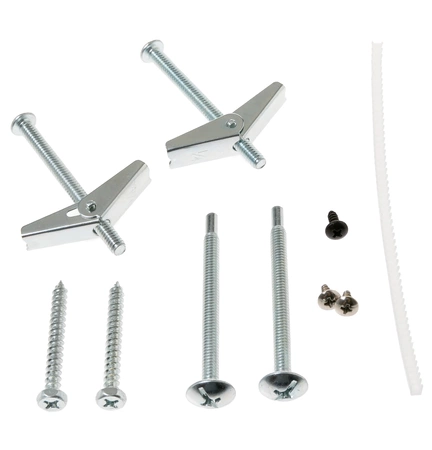
WB01X35373 GE Installation Hardware Bag
WB01X35373 GE Installation H/W Bag
Compatible Brands


About this product
WB01X35373 GE Installation H/W Bag
Replacing the GE WB01X35373 Installation H/W Bag
1. Gather the necessary tools and supplies: Phillips head screwdriver, work gloves, GE WB01X35373 Installation H/W Bag.
2. Turn off the power to the appliance you are replacing the hardware bag on at the circuit box or by unplugging from the wall.
3. Put on your work gloves to protect your hands before handling any hardware.
4. Remove the screws holding the old hardware bag in place.
5. Carefully remove the old hardware bag.
6. Place the new GE WB01X35373 Installation H/W Bag into the appliance where the previous one was located.
7. Secure the new hardware bag with screws or any other fasteners used with the original.
8. Turn the power back on to the appliance.
9. Test the appliance to make sure it works properly.
Congratulations, you have successfully replaced the GE WB01X35373 Installation H/W Bag.
Please keep in mind, these instructions are for general guidance and should always be used in conjunction with the manufacturer's manual, if available.
1. Gather the necessary tools and supplies: Phillips head screwdriver, work gloves, GE WB01X35373 Installation H/W Bag.
2. Turn off the power to the appliance you are replacing the hardware bag on at the circuit box or by unplugging from the wall.
3. Put on your work gloves to protect your hands before handling any hardware.
4. Remove the screws holding the old hardware bag in place.
5. Carefully remove the old hardware bag.
6. Place the new GE WB01X35373 Installation H/W Bag into the appliance where the previous one was located.
7. Secure the new hardware bag with screws or any other fasteners used with the original.
8. Turn the power back on to the appliance.
9. Test the appliance to make sure it works properly.
Congratulations, you have successfully replaced the GE WB01X35373 Installation H/W Bag.
Please keep in mind, these instructions are for general guidance and should always be used in conjunction with the manufacturer's manual, if available.
Login and Registration Form